Change of Radio Frequency
- by Raffael Mancini
- March 29, 2026
For us as pilots, radio communication is an important channel. Important warnings and information about turbulence and/or the composition of the air mass can be transmitted over long distances without relying on a mobile network.
However, anyone can use a PMR radio with the free channels. When outsiders communicate on “our” channel, it disrupts our concentration during flight, or we may miss important information.
To avoid this, unwanted signals can be filtered out. This is done by transmitting a code—the speaker only opens when the received signal contains the correct code. Until now, we have used an analog code (CTCSS). Unfortunately, only 38 codes are available, so the likelihood that others use the same code is relatively high.
To improve this, we would like to switch from CTCSS (analog) to DCS (digital). We expect this change to provide optimal radio communication, especially during the activation of the Paragliding Sector Michelau.
DCS stands for Digital Coded Squelch. The number of available codes increases to 83, which significantly improves the chances of interference-free communication.
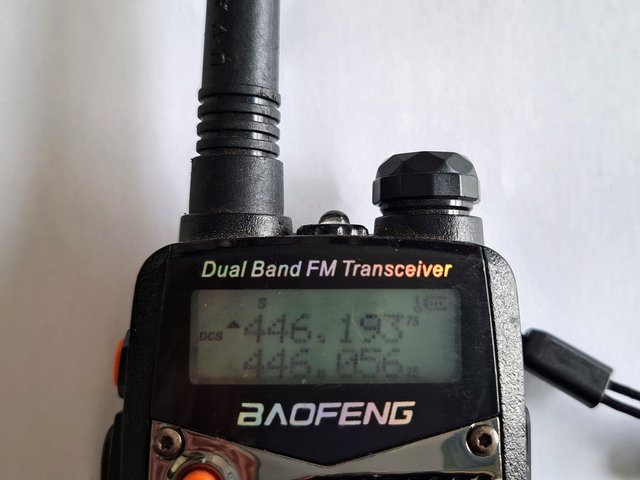
Previous settings: Club frequency: PMR 446.05625; 67.0 Hz (T-CTCSS, R-CTCSS) Sector frequency: PMR 446.19375; 67.0 Hz (T-CTCSS, R-CTCSS)
We have therefore defined the following configuration for our frequency:
Club frequency: PMR 446.05625; D155N (T-DCS, R-DCS)
Sector frequency: PMR 446.19375; D155N (T-DCS, R-DCS)
How to switch from CTCSS to DCS The exact menu structure depends on the radio device, but generally:
Open the menu
Go to Squelch / Tone / CTCSS / DCS
Disable CTCSS
Often labeled: CTCSS OFF or T-CTCSS OFF
Enable DCS
Select the desired DCS code (e.g., in our case: D155N)
Save
Note: When you activate DCS, CTCSS is usually disabled automatically. When DCS is active, a “DCS” symbol will appear on your display.